Why Finding the Right Free PDF Cropper Matters
Cropping a PDF is one of the most effective ways to clean up document layouts, trim unnecessary white margins, remove printer crop marks, and optimize files for reading on mobile screens or tablets. However, choosing the right tool can be surprisingly challenging. Many legacy PDF editors push users toward expensive monthly subscriptions, while low-quality online converters add intrusive watermarks, limit daily usage, or alter original file resolution.
Finding a free, dedicated PDF cropper ensures you can adjust page dimensions quickly and accurately without compromising document quality or security.
- Subscription-Free Margins: Modern web apps and open-source desktop software give you professional cropping control without forcing you into recurring paid plans.
- Granular Control Options: The best croppers let you adjust margins visually via drag-and-drop frames or numerically by entering exact margin offsets in inches or millimeters.
- Batch and Page Scope Settings: Efficient tools allow you to crop single pages, apply identical crop boxes to entire documents, or selectively crop odd/even page ranges for double-sided printing.
- Zero Quality Loss: High-performance PDF croppers modify only internal viewing boundary tags (CropBox coordinates) without re-compressing underlying text layers or embedded graphics.
Whether you need a lightweight web utility, a mobile app like iScanner, or built-in desktop features, choosing the right tool saves both time and storage space.
Top Free PDF Cropper Tools Compared
To help you choose the best solution for your workflow, we evaluated leading free PDF cropping utilities based on ease of use, feature set, platform availability, and processing speed:
| Tool Name | Platform | Key Features | Best For |
|---|---|---|---|
| Dedicated Online Crop Tool | Web-based (All OS) | Instant drag-and-drop visual crop frame, bulk page trimming, no watermark, browser-based encryption | Fast online cropping from any device |
| Mac Preview | macOS Native | Built-in rectangular selection tool (Cmd + K), zero download required, completely offline | Mac users looking for quick margin trimming |
| iScanner / Mobile Scanner Apps | iOS & Android | AI document edge detection, auto-cropping scanned pages, mobile camera integration | Trimming scanned documents and receipts on mobile |
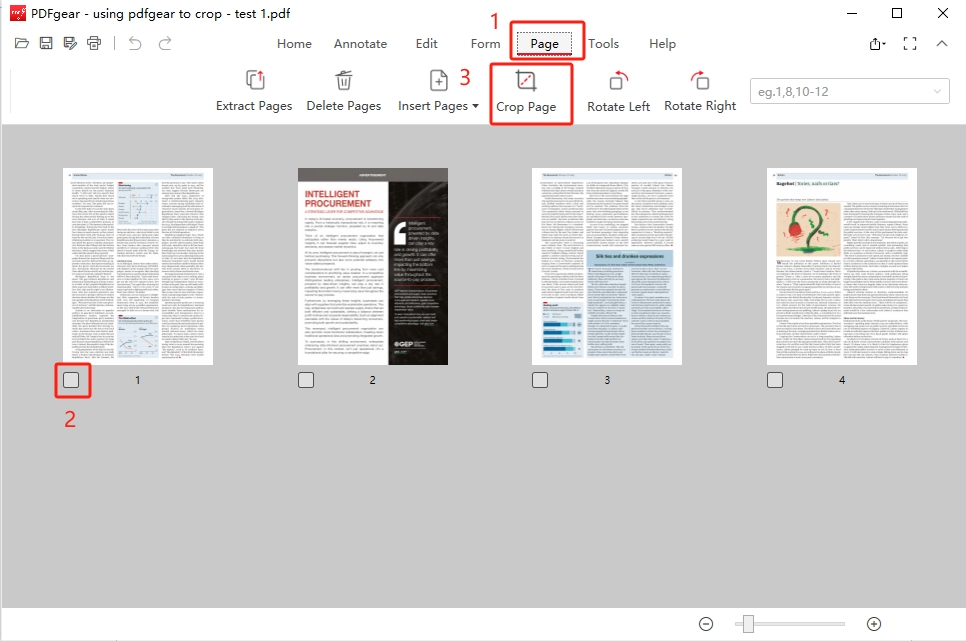
| PDFgear | Windows, Mac, iOS | Completely free desktop editor, visual margin adjustments, custom page range cropping | Unlimited offline desktop editing |
| PDF Resizer / PDF24 | Web-based | Flexible margin offsets, auto-trim whitespace option, bulk file processing | Trimming multi-page documents and eBook margins |
Detailed Breakdown of Leading Cropping Solutions
1. Browser-Based Online Croppers (e.g., Crop PDF Tool)
Web-based tools represent the fastest solution for single-task document edits. By loading your file into a modern web browser, you can visually drag selection handles around the exact area you wish to keep.
- Pros: Works across Windows, macOS, Linux, iOS, and Android without software downloads; instant processing with auto-deletion of temporary cloud files.
- Cons: Requires an active internet connection for uploading and downloading files.
2. Built-in Operating System Tools (Mac Preview & Windows Utilities)
Both macOS and Windows offer built-in options to adjust PDF viewable areas without installing third-party applications. Mac Preview allows users to highlight content with the rectangular marquee tool and press Cmd + K to crop instantly.
- Pros: 100% free, runs entirely offline, maximum file privacy, zero installation required.
- Cons: Limited options for bulk-cropping complex multi-page files with variable margins across odd and even pages.
3. Mobile Scanning & Crop Apps (e.g., iScanner)
Mobile scanning utilities excel at processing physical paper documents captured via smartphone cameras. These applications use computer vision and AI algorithms to automatically detect paper boundaries, remove desk background edges, and correct perspective distortions in seconds.
- Pros: Ideal for paper receipts, handwritten notes, and physical forms; instant mobile access.
- Cons: Free mobile tiers may limit daily exports or require in-app account creation.
How to Choose the Best PDF Cropper for Your Workflow
Selecting the ideal tool depends on your primary document tasks, file security requirements, and hardware environment:
- For Quick One-Off Edits: Use our browser-based online Crop PDF tool. It requires zero setup, works on any platform, and lets you visually set crop boundaries in seconds.
- For Sensitive Offline Files: Stick to local desktop solutions like Mac Preview or standalone desktop editors to process confidential financial or legal records without uploading data to external servers.
- For Digitizing Physical Documents: Use mobile scanning applications with auto-edge detection to convert physical scans into cleanly cropped PDF pages on the go.
- For Extra File Size Savings: Remember that cropping hides margins but does not always reduce storage footprint. Pair your cropping workflow with our online Compress PDF tool to clear out unneeded background assets and minimize final file sizes.
Frequently Asked Questions
What is the difference between cropping and compressing a PDF?
Cropping alters the visible display boundaries (CropBox coordinates) of a PDF page to trim away margins or extra space. Compression reorganizes internal file data, removes redundant metadata, and optimizes embedded images to decrease overall file size in megabytes.
Is it safe to use free online PDF croppers?
Yes, reputable online tools process files using secure HTTPS encryption and automatically purge processed documents from server storage after a short time window.
Can I crop a PDF on a mobile phone without installing an app?
Yes! You can open your mobile browser (such as Safari or Chrome), navigate to our online Crop PDF tool, upload your document, and drag the visual cropping box using your touchscreen.
Does cropping permanent hide content in a PDF?
Cropping hides the area outside your selected box when viewing or printing the PDF. However, to permanently erase sensitive hidden data outside the crop area, save the file as a flat PDF or run it through a dedicated PDF publishing tool.
Ready to crop?
Use our free online tool to process your files securely in high quality. No sign-up required.
Open crop Tool